Understanding Process Maps
How to read and interpret the auto-generated swimlane diagrams, bottleneck indicators, and cross-functional handoff visualizations.
Process maps are the visual output of the analysis phase. Here's how to read them.
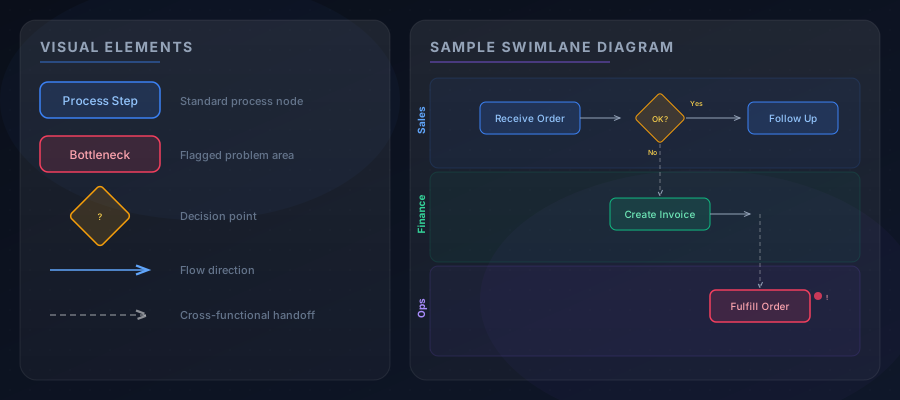
Swimlane Diagrams
Each process map uses a swimlane layout where:
- Horizontal lanes represent different roles or departments
- Process nodes show individual steps within a lane
- Arrows indicate the flow direction and sequence
- Dashed lines show cross-functional handoffs between lanes
This layout makes it easy to see who does what and where work crosses organizational boundaries.
Key Visual Elements
Process Nodes
- Standard nodes — regular process steps shown in the department's color
- Red/highlighted nodes — bottlenecks or problem areas identified by the AI
- Decision diamonds — points where the workflow branches based on conditions
Handoff Indicators
Cross-functional handoffs are shown as dashed lines between lanes. These are often where delays, errors, and communication breakdowns occur — making them prime targets for automation.
Bottleneck Markers
Steps flagged as bottlenecks include:
- Visual highlighting (red indicators)
- Severity assessment (low, medium, high)
- Contributing factors identified from interviews (e.g., "manual data entry from three systems")
Using Process Maps
Process maps serve as the foundation for:
- Validating understanding — share with stakeholders to confirm accuracy
- Identifying improvement opportunities — bottlenecks and handoffs are natural targets
- Feeding opportunity scoring — each step is assessed for AI automation potential
- Creating documentation — exportable as part of the knowledge wiki