Platform Admin Controls
How platform administrators manage per-organization feature access: AI toggles, BYOK, seat limits, and model tiers.
Platform administrators have granular control over what features are available to each organization. These controls exist above organization-level settings and enforce platform-wide governance policies.
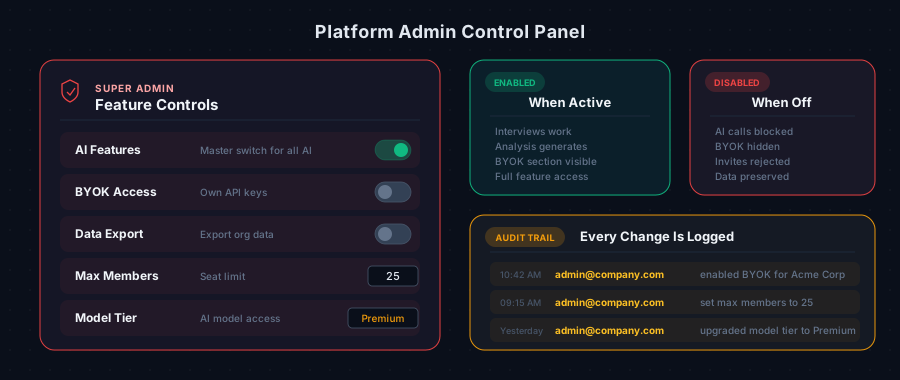
Available Controls
| Control | Default | Description |
|---|---|---|
| AI Features | Enabled | Master switch for all AI-powered features (interviews, analysis, recommendations) |
| BYOK Access | Disabled | Allow the organization to store and use their own API keys |
| Data Export | Disabled | Allow the organization to export their data |
| Max Team Members | Unlimited | Maximum number of members allowed in the workspace |
| Model Tier | Subscription default | Override which AI models the organization can access |
| Allowed Email Domains | None (all allowed) | Platform-level domain restrictions for team invitations |
How Controls Affect Organizations
AI Features (Kill Switch)
When disabled, all AI-powered features stop immediately:
- Voice interviews cannot be started
- Analysis generation (scoring, recommendations) is blocked
- Wiki and agent brief generation is blocked
- Existing results remain visible but cannot be regenerated
This is useful for:
- Temporarily suspending an account during a billing dispute
- Complying with a data processing freeze request
- Emergency situations requiring immediate AI shutoff
BYOK Access
When enabled, organization owners see the API Keys section in their workspace settings. When disabled:
- The BYOK settings section is hidden
- Any previously stored keys remain encrypted but are not used
- All AI requests use platform keys
Max Team Members
When set, the platform enforces a seat limit:
- New invitations are blocked when the limit is reached
- Existing members over the limit are not removed
- The limit counts all members (owners + admins + members)
Example: If set to 10 and the team already has 10 members, new invitations are rejected with a "team at capacity" message.
Model Tier
Controls which AI models are available:
- Default: Organization uses models included with their subscription plan
- Premium: Organization gets access to higher-capability models (e.g., Opus for all tasks instead of just deep analysis)
Allowed Email Domains (Platform Level)
Platform administrators can set domain restrictions that apply in addition to any restrictions the organization sets themselves.
When both platform and organization restrictions exist:
- A domain must be in both lists to be allowed
- This prevents organizations from loosening restrictions set by the platform
- See Domain Restrictions for details
Audit Trail
All changes to organization controls are logged in the admin audit trail with:
- Who made the change (admin user)
- Which organization was affected
- What was changed
- When the change was made
This ensures full accountability for governance decisions.
For Organization Owners
If a feature you expect is missing or a limit is preventing your work:
- Check your workspace settings to understand what's currently available
- Contact your platform administrator to request changes
- The administrator can adjust controls immediately — changes take effect on the next request
Frequently Asked Questions
Can I see which controls are set for my organization? Some controls are visible in your settings (like whether BYOK is available). Others (like the AI kill switch) are only visible through their effects. If AI features suddenly stop working, contact your platform administrator.
Do control changes affect existing data? No. Disabling AI features or BYOK doesn't delete any existing analysis, recommendations, or stored keys. It only prevents new operations.
Can controls be set per-project or per-user? Currently, controls apply at the organization level. All projects and users within the organization share the same settings.