Bring Your Own Key (BYOK)
Use your own API keys for AI providers — direct billing, higher rate limits, and full data control.
BYOK (Bring Your Own Key) lets your organization use its own API keys for AI providers instead of the platform's shared keys. This gives you direct billing relationships, potentially higher rate limits, and complete control over your data processing agreements.
Why Use BYOK?
| Benefit | Description |
|---|---|
| Direct billing | AI usage billed directly to your provider account, not through platform credits |
| Higher rate limits | Your own API tier with the provider, independent of other platform users |
| Data agreements | Your organization's data processing terms apply directly with the provider |
| Compliance | Meet internal procurement policies that require direct vendor relationships |
| Cost visibility | See exact API costs in your provider's dashboard |
Prerequisites
BYOK must be enabled for your organization by a platform administrator. If you don't see the BYOK section in your settings, contact your platform administrator to request access.
Supported Providers
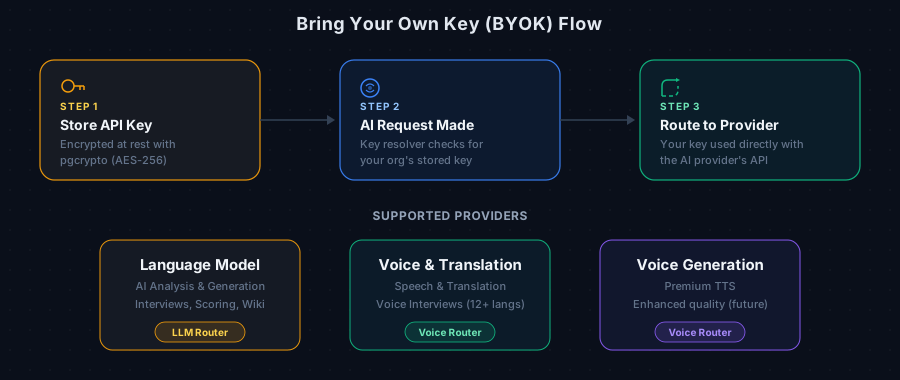
Language Model Provider
Powers all AI analysis: interviews, opportunity scoring, recommendations, agent briefs, and wiki generation.
- What it affects: All LLM-powered features across the platform
Voice & Translation Provider
Powers voice interviews: speech-to-text, text-to-speech, and translation for 12+ Indian languages.
- What it affects: Voice interview recording and playback
Voice Generation Provider
Premium voice generation (future capability).
- What it affects: Enhanced TTS quality for interviews
Provider details and key setup instructions are available in your workspace Settings page under the API Keys (BYOK) section once BYOK is enabled.
Managing API Keys
Adding a Key
- Navigate to your workspace Settings page
- Scroll to the API Keys (BYOK) section
- For the provider you want to configure, enter your API key
- Click Save
Your key is encrypted immediately upon saving. We store only an encrypted version — the original key is never saved in plain text.
Key Security
| Security Measure | Details |
|---|---|
| Encryption at rest | AES-256 encryption using PostgreSQL's pgcrypto |
| Key hint display | Only the last 4 characters are shown (e.g., "...xK7q") |
| Access control | Only workspace owners can manage keys |
| Server-side only | Keys are never sent to the browser — decrypted only at request time on the server |
Removing a Key
- Navigate to workspace Settings
- Find the provider in the API Keys (BYOK) section
- Click Remove
When a key is removed, the platform automatically falls back to the shared platform key for that provider. Your AI features continue working without interruption.
How It Works
When your organization makes an AI request (e.g., generating recommendations), the platform follows this resolution chain:
- Check BYOK: Is there an active key stored for this provider?
- If yes: Decrypt and use your organization's key directly with the provider
- If no: Fall back to the platform's shared key and deduct credits as usual
Credit Impact
| Scenario | Credits Deducted? |
|---|---|
| Using BYOK key | Yes — credits are still deducted for platform usage tracking |
| Using platform key | Yes — credits cover both platform usage and AI provider costs |
Credits are always deducted for usage tracking and platform features. When using BYOK, you pay the AI provider directly through your own account, but the platform still tracks usage through credits.
Frequently Asked Questions
Will my existing analysis results be affected? No. Changing API keys only affects future requests. All existing analysis, recommendations, and briefs remain unchanged.
What happens if my BYOK key is invalid or expired? The request will fail with an error from the provider. The platform does not automatically fall back to the shared key — this ensures you maintain control over which key is used. Update or remove the key to restore service.
Can different team members use different keys? No. BYOK keys are set at the organization level. All team members share the same key for each provider.
Can I use BYOK for some providers and platform keys for others? Yes. Each provider is configured independently. You might use your own LLM key while relying on the platform's voice provider key, for example.
Is there a way to verify my key works before saving? The platform validates key format when saving. For a full connectivity test, try running a small operation (like generating a summary) after saving the key.